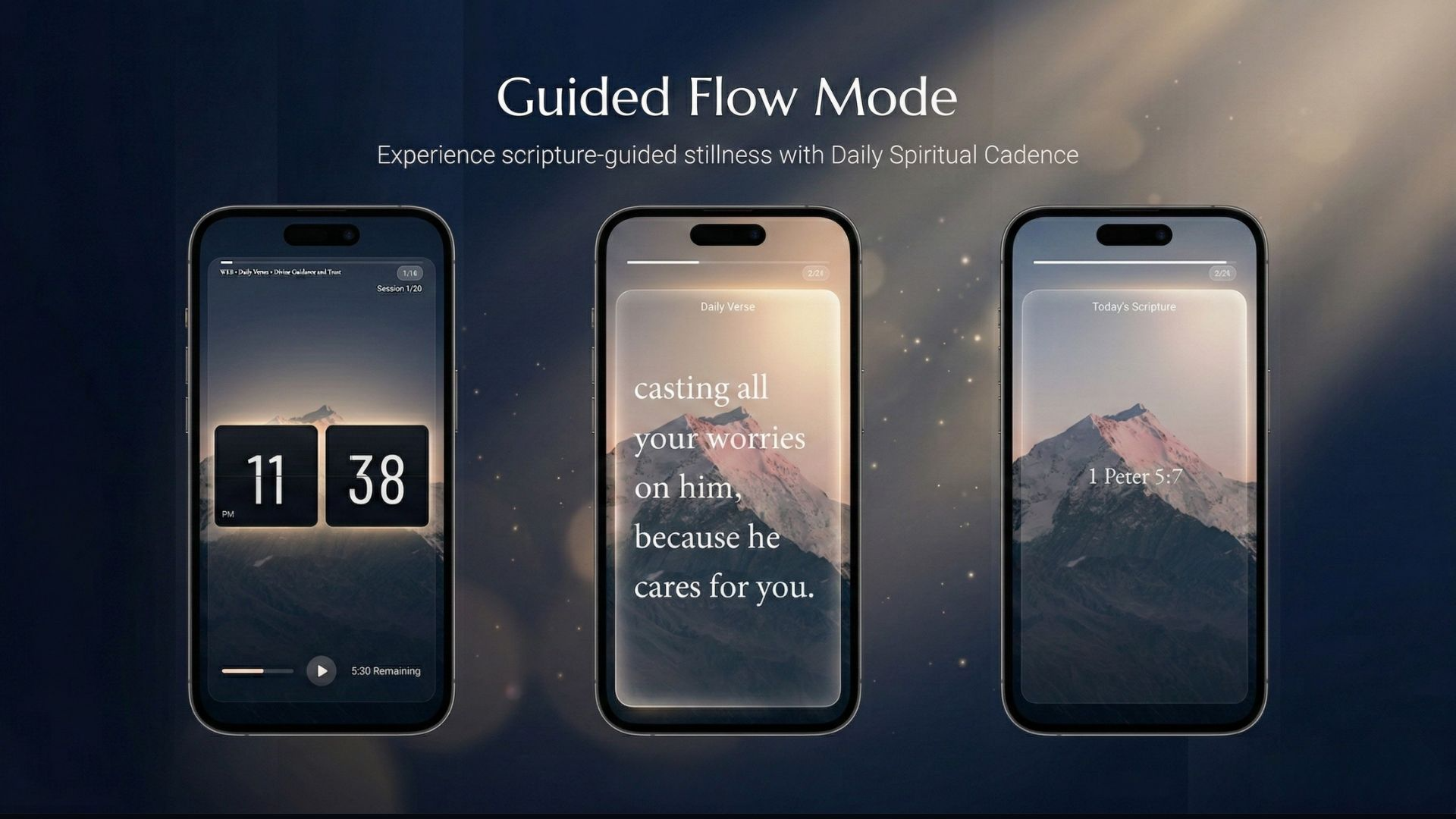
Guided Flow Mode: A New Way to Meditate on Scripture
Let your screen carry you through God’s Word - one breath at a time.
There’s a difference between seeing a Bible verse and sitting with it.
Most of us glance at our screens dozens of times a day: a quick peek at the time, a passing moment of stillness. Bible Clock has always been there for those moments, quietly placing Scripture alongside the clock. But what if those moments could go a little deeper?
That’s the idea behind Guided Flow Mode - a display feature that gently walks you through Scripture in a continuous, meditative rhythm.
What Is Guided Flow Mode?
Guided Flow Mode transforms your Bible Clock screen into a slow, deliberate journey through Scripture. Instead of showing the clock and verse side by side, it moves through three stages, one after another:
Clock -> Verse -> Reference
Each stage fades in on its own, giving you time to pause on what matters: the moment, the Word, and where it comes from before gracefully moving to the next verse.
Think of it as a rotating devotional that runs quietly in the background of your day.
How It Flows
Stage 1 - The Clock
Your screen opens with just the time. A moment to be present. To breathe.
Stage 2 - The Verse
The Scripture appears in full. Large, clear, and centered. No distractions, just the Word.
Stage 3 - The Reference
The book, chapter, and verse appear. A quiet moment to anchor what you just read before moving forward.
Then the cycle begins again with the next verse in your collection.
A thin progress bar at the top tracks where you are in the cycle, and a verse counter in the corner shows your place in the collection.
You’re in Control of the Pace
Every step of Guided Flow Mode is fully configurable. In Display Settings, you’ll find three timing controls when Guided Flow Mode is active:
| Setting | What it controls | Default |
|---|---|---|
| Clock Duration | How long the clock is shown | 5 seconds |
| Verse Duration | How long the verse is displayed | 20 seconds |
| Reference Duration | How long the reference is shown | 5 seconds |
Want to linger on each verse longer? Increase verse duration. Prefer a faster rhythm? Dial everything down. It’s your pace, your practice.
Perfect For
- Ambient display - Let your phone or tablet run on a table, nightstand, or desk as a living devotional.
- Morning routines - Start your day cycling through promises from God’s Word.
- Prayer time - Use it as a gentle prompt while you sit in stillness.
- Family spaces - A shared screen that quietly displays Scripture throughout the day.
How to Enable It
- Open Bible Clock and go to Settings.
- Under Display, tap Display Mode.
- Select Guided Flow (Auto Rotation).
That’s it. Your screen will begin its quiet journey through Scripture.
Pro tip: Pair Guided Flow Mode with a curated verse collection, like God’s Love or Strengthen Your Faith, for a more personal rhythm.
Live Demo
See Guided Flow Mode in action:
A Small Feature With a Big Invitation
We designed Guided Flow Mode for the in-between moments, the ones we often let slip by. A slow, unhurried cycle through Scripture is a small thing. But over the course of a day, those small moments of encounter with God’s Word have a way of adding up.
We hope it becomes a quiet blessing in your daily rhythm.
Guided Flow Mode is available from Bible Clock version 2.6.1. Learn more on the Bible Clock project page.