Stamp Your Pic Is Now on Android: A No-Ads Timestamp Camera for Your Church
Add the date, place, and GPS location to every photo from mission trips, baptisms, VBS, and serve days. No ads, no account, no subscription.
Keep CodeInFaith in your Google feed
Add us as a preferred source to see more of our latest articles in Google Search.
Every church has a camera roll full of moments nobody can place a year later. Which summer was that VBS? Where did the youth group serve that Saturday? What was the date of the baptism at the lake?
Stamp Your Pic fixes that at the shutter. It is a GPS and timestamp camera app that prints the date, time, place, and GPS coordinates right onto your photo, in a design you choose. And today it is available on Android through Google Play.
The iPhone version is coming soon.
No ads. Not one.
Let’s start with the part we care about most. Stamp Your Pic has no ads.
No banner across the bottom of your camera. No video you have to sit through before you can save a photo of your pastor baptizing someone. No third-party ad networks tracking what you shoot.
We left them out because we care about the experience of the people using our apps. A camera should feel calm and fast, especially when you’re trying to capture a moment that only happens once. The only links you’ll find in the app are to our other CodeInFaith apps.
There’s also no subscription and no account. You open the app and take a picture.
How Stamp Your Pic works
- Take the photo. The moment is locked in when you press the shutter: time, place, GPS, altitude, and compass heading.
- Swipe through stamps. Every design is drawn live on your own photo, so you see exactly what you’ll save.
- Save the one you like. The stamped photo goes to your gallery at full resolution, ready to share in a group chat, a slideshow, or the church newsletter.
You can also stamp a photo you already took. Pick it from your gallery and the app uses the date and GPS saved in the file.
A church photo app with stamps made for ministry
Most timestamp camera apps are built for job sites. Stamp Your Pic has those too, but it also includes a Church collection of 12 designs made for church life:
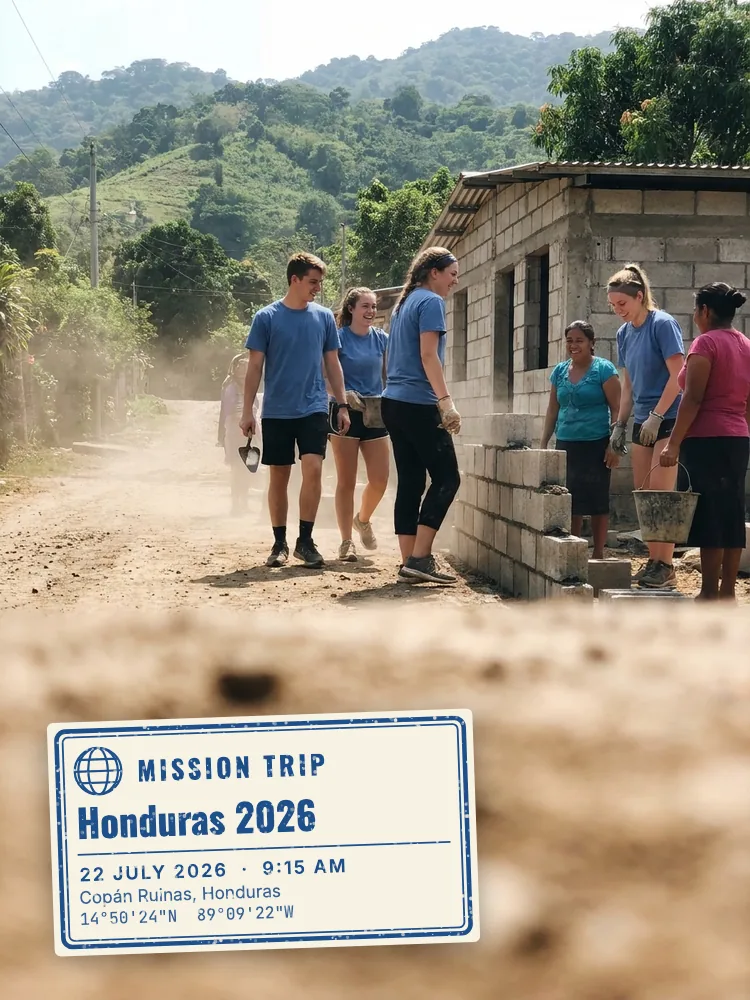
- Mission Trip
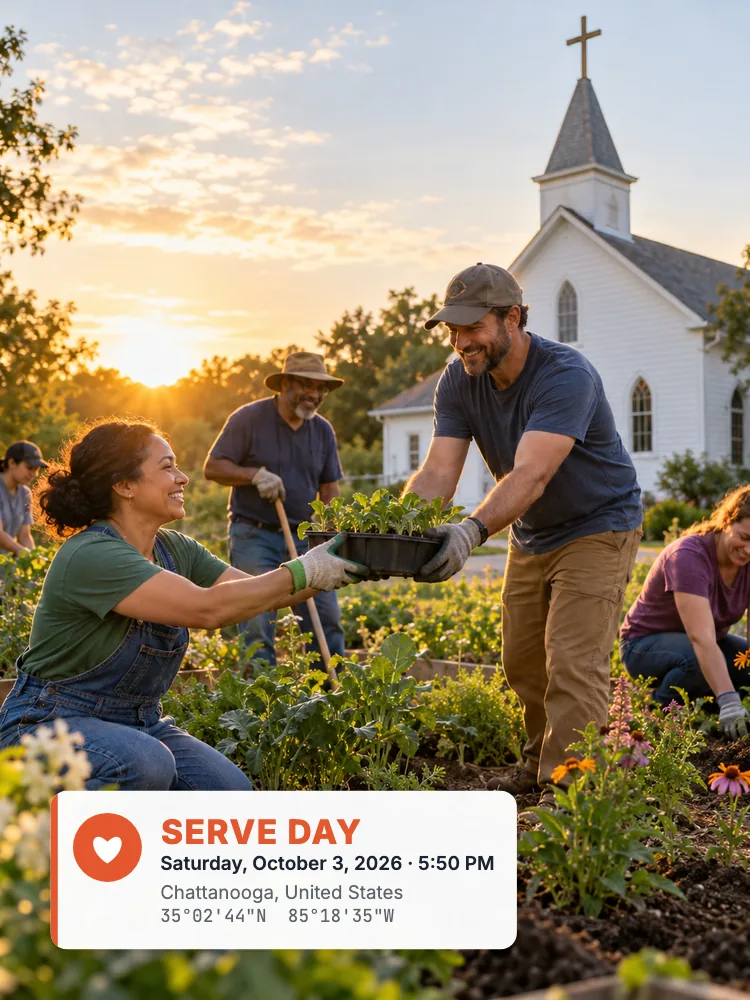
- Serve Day
- Building Project
- Baptism
- Lord’s Day
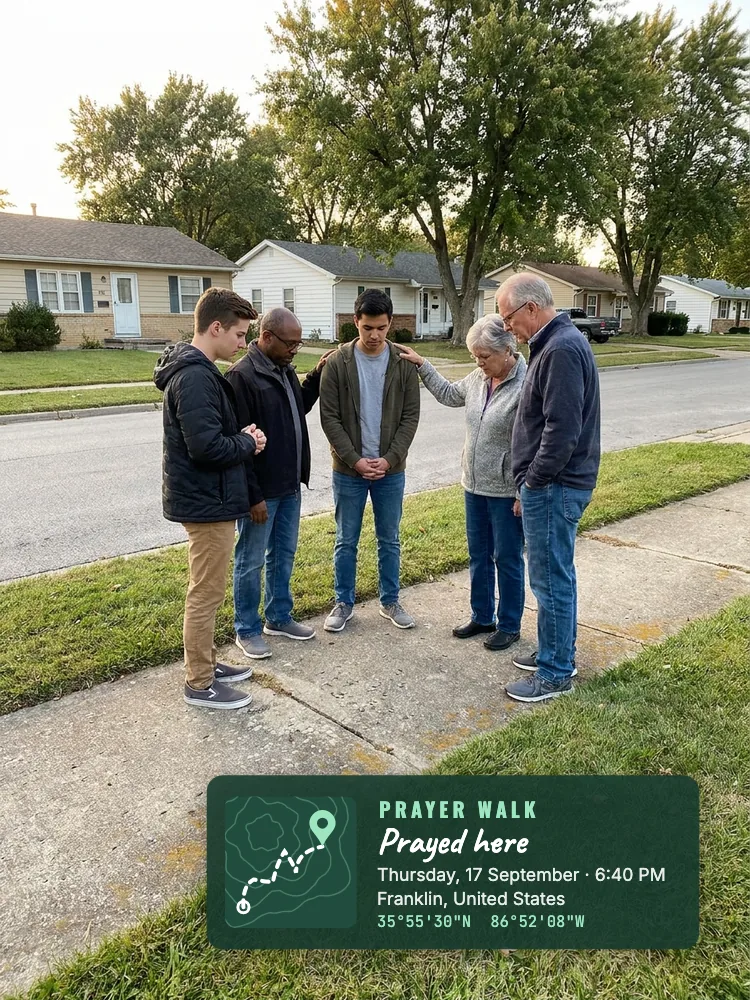
- Prayer Walk
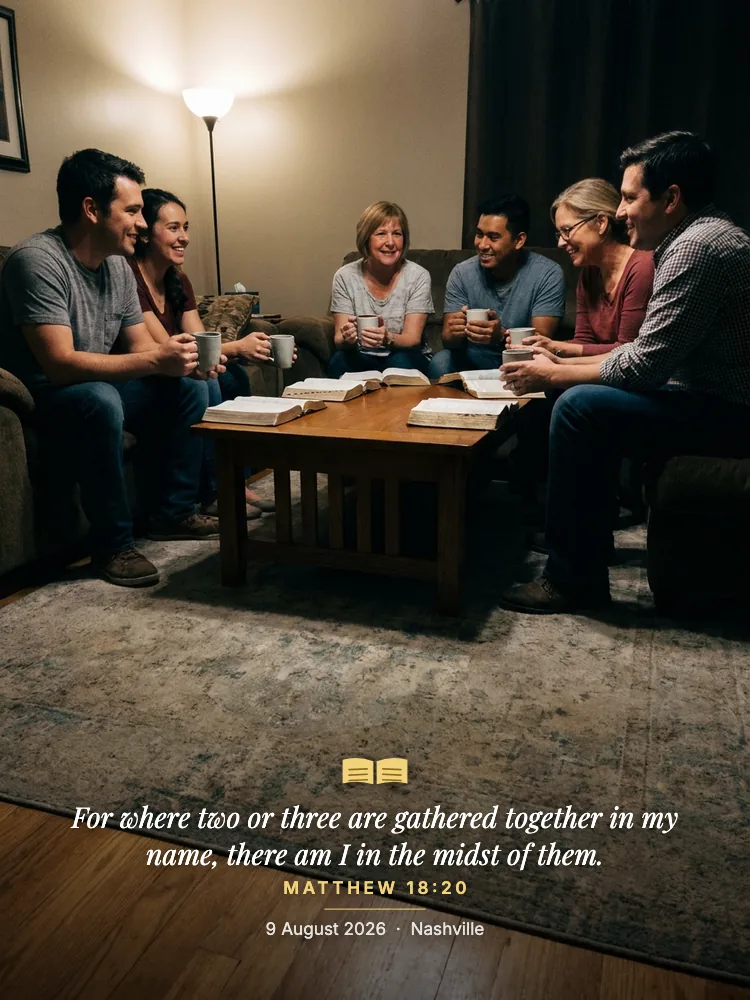
- Verse
- VBS
- Small Group
- Worship Night
- Ministry Team
- Retreat
Many of these designs read your own note, so the stamp says what the moment was. Type the team name on a Mission Trip stamp, the name of the person being baptized on a Baptism stamp, or your church’s name on a Lord’s Day stamp.
7 ways to use Stamp Your Pic in your church
1. Mission trip photos that tell supporters where you were
Supporters want to see where their gifts and prayers went. A Mission Trip stamp puts the place, the date, and the GPS coordinates on every photo, so a support letter or a Sunday update slide answers “where was this?” without a caption. It works offline too, because GPS comes from the phone, not the internet.
2. Baptism photos families will keep
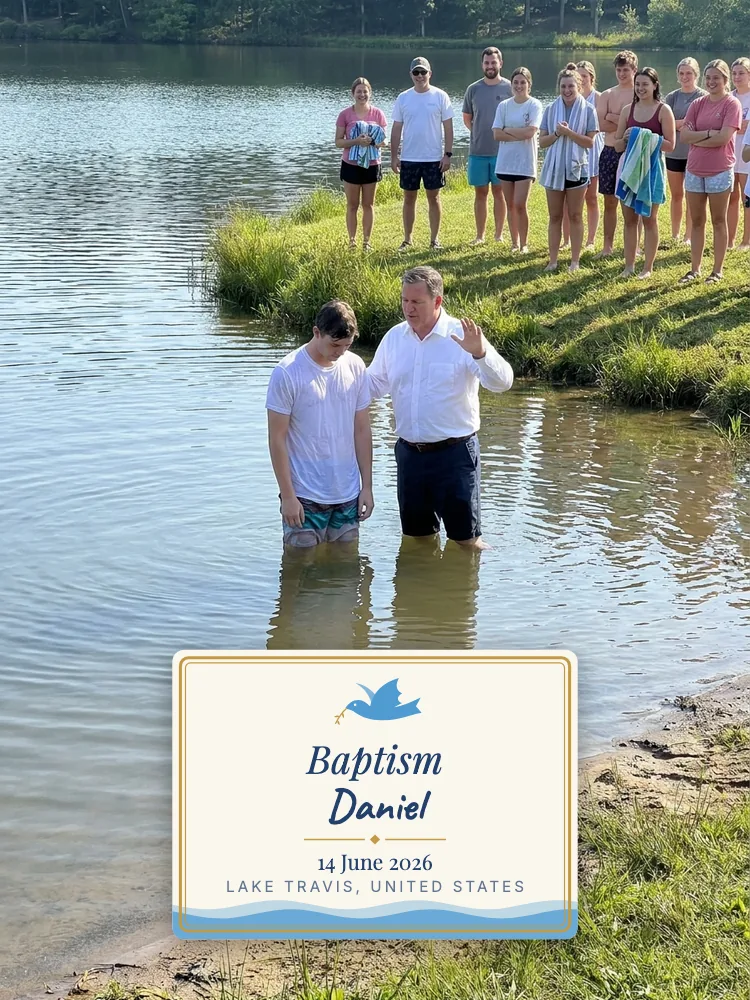
A baptism is a day people want to remember exactly. The Baptism stamp adds the name, the date, and the place on a simple card with a dove. Families get a photo they can frame, and your church gets a dated record of the day.
3. VBS, camps, and retreats
Week-long events produce hundreds of photos, and a year later they all blur together. Stamp them with the VBS or Retreat design and every picture carries its own day and place. That makes it easier to build the end-of-week slideshow, and easier to find the right photos next year.
4. Serve days and community outreach
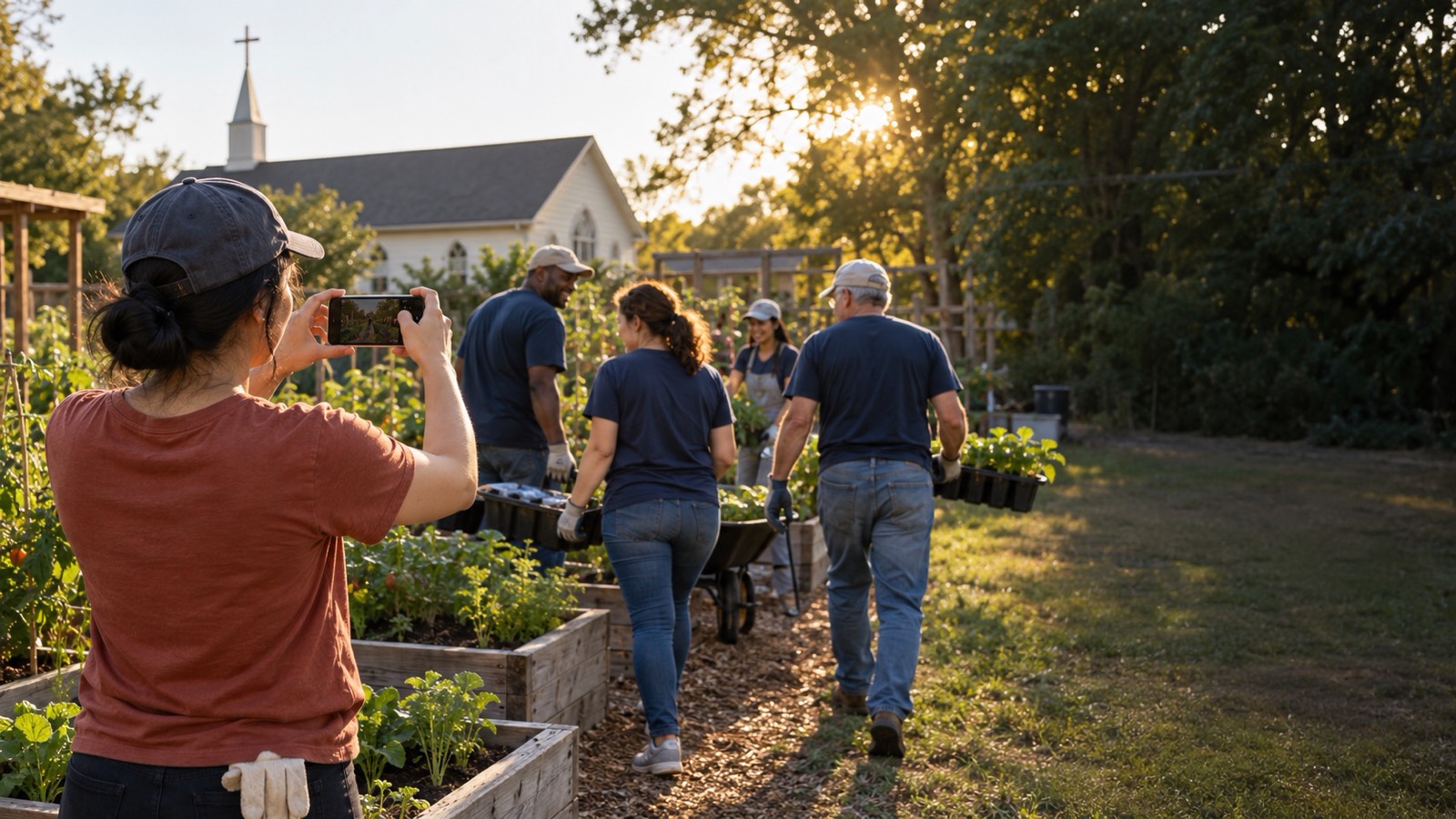
When your church serves the neighborhood, a stamped photo shows when and where it happened. That helps with a recap for the congregation, a thank-you post for volunteers, or a report to a partner organization.
5. Prayer walks around your neighborhood
Prayer walking is easy to forget once you get home. The Prayer Walk stamp marks each stop with “Prayed here,” the time, and the coordinates, so your team keeps a record of where you prayed and when.
6. Building projects and facility care
Building projects and repairs need dated photos for committees, contractors, and insurance. Use the Building Project stamp for the church family, or the Work stamps such as Site Report and Inspection Tag for a more formal record. With Lifetime Pro, the Work stamps can carry your church’s logo.
7. A verse on the photos you share
The Verse stamp prints a Bible verse with the date and place. Leave the note empty and it uses the verse of the day, or type your own verse into the note. It works well for small group photos, worship nights, and social posts from Sunday.
Built with privacy in mind
Church photos often include children, families, and people who didn’t ask to be online. Stamp Your Pic keeps them on your device:
- Your photos are never uploaded. They stay on your phone.
- No account. There’s nothing to sign up for.
- You choose the GPS data. The saved photo keeps its capture time, and GPS is written into the file only if you turn that on. The stamp on the picture is separate from the hidden file data.
- Light analytics only. Crash reports and basic usage, such as which design was saved. Never your photos, location, or notes.
To show a place name, the coordinates go to your phone’s built-in geocoding service.
A proper camera, too
Stamp Your Pic is a full camera, not just an overlay tool. It has zoom, tap to focus and expose, AE/AF lock, 4:3, 16:9, or 1:1 framing, a grid, a self-timer, favorites and recent stamps, and meters or feet. The app is available in 8 languages, so volunteers and mission partners can use it in their own language.
Free to start, Pro once for life
You can download Stamp Your Pic for free and start stamping photos right away. Lifetime Pro is a one-time purchase that unlocks every design, including the full Church collection, plus unlimited saves, your logo on Work stamps, and every design we add later.
There’s no subscription and no ads on either plan.
Download Stamp Your Pic on Android
Stamp Your Pic is available now on Google Play. If your church uses iPhones, the iOS version is coming soon. Keep an eye on the Stamp Your Pic page for the App Store link.
Have an idea for a church stamp we should add? Write to us at [email protected].
Frequently asked questions
Is Stamp Your Pic available on Android?
Yes. Stamp Your Pic is available now on Google Play for Android phones. The iPhone version is coming soon.
Does Stamp Your Pic have ads?
No. Stamp Your Pic has no third-party ads, on the free version or with Lifetime Pro. The only links you will see are to our other CodeInFaith apps.
Can I add the date and location to photos I already took?
Yes. Pick a photo from your gallery and Stamp Your Pic uses the date and GPS location already saved in that photo.
Does it need an internet connection?
No. The time, GPS coordinates, altitude, and compass heading come from your phone. A connection only adds the place name and street address.
Is Lifetime Pro a subscription?
No. Lifetime Pro is a one-time purchase. It unlocks every stamp design, including the full Church collection, plus unlimited saves and designs added later.
Are my church photos uploaded anywhere?
No. Your photos stay on your phone and are never uploaded to a server. There is no account to create.